Sama dengan postingan sebelumnya. Yang harus dipersiapkan terlebih dahulu adalah :
1. Memberi ip pada pc server dan client dalam satu segmen
2. Sharing dan beri nama printer server
3. Buat akun, password dan workgroup pada server (trims om Ilham FUI bisikannya. Sempat mumet sebelumnya. hehehe…)
4. Instal samba dan dependecy nya (samba client) pada PC client pada kasus ini ubuntu
5. Instal driver printer pada pc client
Langkah-langkah sharing printer di client ubuntu.
1. Masuk system setting. Kemudian pilih devices dan printer

2. Klik additonal printer setting
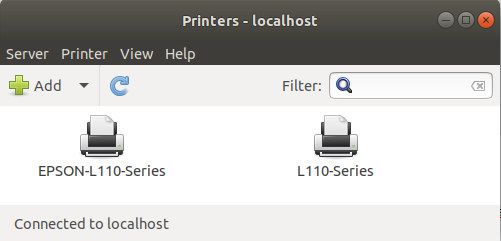
3. Klik add. Kemudian pilih Network printer lalu windows printer via samba. Pada smb printer isi //nameprinter. Kemudian klik forward

4. Pilih sesuai nama manufaktur printer sharing kemudian klik forward

5. Pilih driver tipe printer. Kemudian klik forward

6. Pada kotak dialog yang muncul, biarkan saja setingan namanya tetap seperti yang muncul. Kemudian klik apply
7. Kllik print tes page. Jika berhasil maka printer akan bekerja seperti mestinya
Selamat mencoba !!!
mantap om sharing nya 😀
adaw… embahnya nongol. trims bisikannya om
Pretty nice post. I just stumbled upon your blog and wanted
to say that I have really enjoyed surfing around your blog posts.
After all I’ll be subscribing to your rss
feed and I hope you write again very soon!
thanks for comment n visit my blog
What i don’t understood is if truth be told how you are now not actually a lot more smartly-liked than you might
be right now. You are very intelligent. You realize thus significantly when it comes
to this topic, made me individually believe it from so many various angles.
Its like men and women are not interested unless it is something to accomplish with Woman gaga!
Your personal stuffs nice. Always maintain it up!
thanks for comment n visit my blog
Временная регистрация в Москве
I’m not sure where you’re getting your info, but great topic.
I needs to spend some time learning much more or understanding more.
Thanks for fantastic info I was looking for this info for my mission.
It show every sign of like a common game. I did not discover any
bolt!
Usually I don’t learn post on blogs, but I wish to say that this write-up very pressured me to try and do so!
Your writing taste has been amazed me. Thank you, very nice article.
І’d incessantly want to be update on new articles
on this site, saved to my bookmarks!
My blog … singapore math tuition
After I initially left a comment I seem to have clicked on the -Notify me when new comments are added- checkbox and now each
time a comment is added I receive four emails with the exact same comment.
Is there a way you are able to remove me from that service?
Thanks!
I am curious to find out what blog platform you’re working with?
I’m having some minor security issues with my latest site
and I would like to find something more risk-free. Do you have
any suggestions?